授業や教材作成で、Googleフォームの4択問題を大量に作るのは非常に手間がかかります。
1問ずつ手で作ると、
- 問題を作る
- 選択肢を入力する
- 正解を設定する
という作業を何十回も繰り返す必要があります。
そこで今回は、Googleスプレッドシートに入力した正解データをもとに、Googleフォームを自動で作成するGAS(Google Apps Script)を紹介します。
しかも、
- スプレッドシートと同じフォルダに自動保存
- クイズ形式(自動採点)
- 正解付き4択問題を自動生成
という、実用レベルのコードです。
目次
できること
このプログラムを実行すると:
- スプレッドシートのB列を読み取る
- 各行の「ア・イ・ウ・エ」を正解として認識
- Googleフォームに4択問題を自動作成
- フォームは同じフォルダに保存される
- クイズ形式で自動採点可能
スプレッドシート
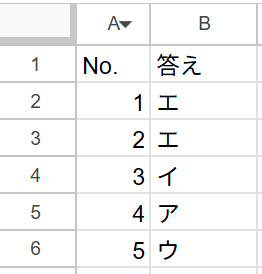
プログラム
function createFormUnderSameFolder_NoNumber() {

  // ===== 設定 =====
  const SHEET_NAME = 'シート1';   // シート名
  const FORM_TITLE = '4択フォーム';
  const QUESTION_TITLE = '問題';   // ←固定(番号なし)
  const OPTIONS = ['ア', 'イ', 'ウ', 'エ'];

  // ===== スプレッドシート取得 =====
  const ss = SpreadsheetApp.getActiveSpreadsheet();
  const sheet = ss.getSheetByName(SHEET_NAME);
  const sheetFile = DriveApp.getFileById(ss.getId());

  // ===== 同じフォルダ取得 =====
  const parentFolders = sheetFile.getParents();
  if (!parentFolders.hasNext()) {
    throw new Error('親フォルダが見つかりません');
  }
  const parentFolder = parentFolders.next();

  // ===== フォーム作成 =====
  const form = FormApp.create(FORM_TITLE);
  form.setIsQuiz(true);

  // ===== フォームを同じフォルダに移動 =====
  const formFile = DriveApp.getFileById(form.getId());
  parentFolder.addFile(formFile);
  DriveApp.getRootFolder().removeFile(formFile);

  // ===== データ取得(B列基準)=====
  const lastRow = sheet.getLastRow();
  const data = sheet.getRange(2, 2, lastRow - 1, 1).getValues(); // B列のみ

  // ===== 問題作成 =====
  for (let i = 0; i < data.length; i++) {

    const answer = String(data[i][0] || '').trim();

    if (answer === '') continue;

    if (!OPTIONS.includes(answer)) continue;

    const item = form.addMultipleChoiceItem();

    item.setTitle(QUESTION_TITLE);  // ←完全に「問題」のみ
    item.setRequired(true);

    const choices = OPTIONS.map(opt =>
      item.createChoice(opt, opt === answer)
    );

    item.setChoices(choices);
    item.setPoints(1);
  }

  Logger.log("フォーム編集URL: " + form.getEditUrl());
  Logger.log("回答URL: " + form.getPublishedUrl());
}